|
RNS:: TopSelecText
 |
|
 Overview of TopSelecText 4.4 Overview of TopSelecText 4.4 |  |
|
|
|
 |
|
 |
| |
 |
|
TopSelecText:
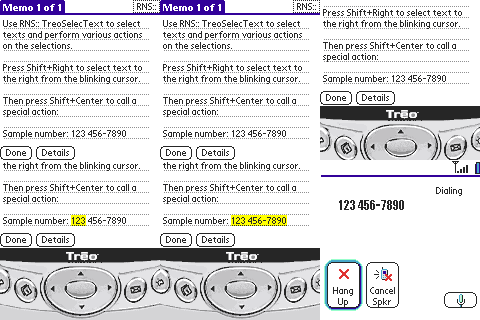
Highlight text with the 5-Way Navigator. Dial numbers by pressing Shift+Center. |
Quick links:
Average reviewer ratings:
| |
|
| |
|
|
|
| TreoSelecText becomes TopSelecText | |
|
|
|
|
|
|
| |
|
This application now supports Treo and Centro smartphones, so we decided to give it a more general name.
RNS:: TreoSelecText was renamed to RNS:: TopSelecText.
Free updates for all RNS:: products are still valid for renamed products.
| |
|
|
|
| You and your Treo device need this | |
|
|
|
|
|
|
| |
|
Easy to use, feels like it was always there.
It fundamentally changes the way one interacts with text on the device.
Normally, there is no way to select/highlight text on your Treo 600/650/680/700p/755p or Palm Centro smartphone without removing the stylus or struggling with a finger.
Now you can do it!
| |
|
|
|
| Select text! | |
|
|
|
|
|
|
| |
Use the following Shift and 5-Way Navigator combinations to highlight words:
 |
- Shift+Left
- Shift+Right
- Shift+Up
- Shift+Down
|
| |
|
|
|
| Hyperlink! | |
|
|
|
|
|
|
| |
Use the Shift+Center combination to do one of these:
|
- dial selected number
- send SMS to selected number
- send e-mail to selected address
- navigate selected web address
- lookup selected name in contacts
- highlight current word
- highlight current line
- highlight whole text field
- show system command bar
 copy selection / paste text at cursor copy selection / paste text at cursor
|
| |
|
|
|
| TopSelecText user's resources | |
|
|
|
|
|
|
| |
 Forum - read comments about TopSelecText and post your own messages. Forum - read comments about TopSelecText and post your own messages.
| |
|
|
|
| Much more for your Treo or Centro smartphone! | |
|
|
|
|
|
|
| |
So you have a Treo or Centro device... Great!
Visit the Software for Treo and Centro smartphones web site to discover all our applications for your phone!
| |
|
Palm, Treo, and Centro are trademarks or registered trademarks of Palm, Inc.
Copyright © 2026 RNS::
| |