RNS:: TopRingtoneInstallerSoftware author: Radoslaw Nowak (RNS::) | ||||||||||||||||||||||||||||||||||||||||||||||||||||||||||||||||||||||||||||||||||||||||||||||||||||||||||||||||||||||||||||||||||||||||||||||||||||||||||||||||||||||||||||||
 |
|
 |
|||||||||||||||
 |
|||||||||||||||||
| |||||||||||||||||




|
|
|
||||||||
|
||||||||||
| This application now supports Treo and Centro smartphones, so we decided to give it a more general name. RNS:: TreoRingtoneInstaller was renamed to RNS:: TopRingtoneInstaller. Free updates for all RNS:: products are still valid for renamed products. | ||||||||||
|
|
|
||||||||
|
||||||||||
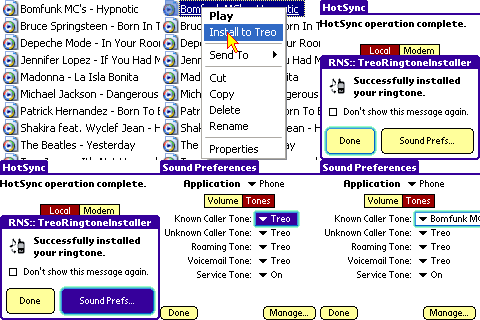
TopRingtoneInstaller is a desktop application that can load any MP3 and MIDI file from your PC and install it directly to your Treo or Centro smartphone, making it available for the Phone.
TopRingtoneInstaller is as simple as it can be.
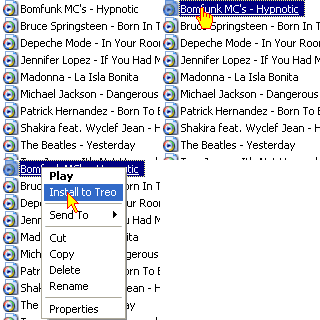
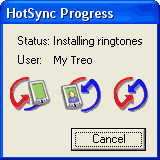
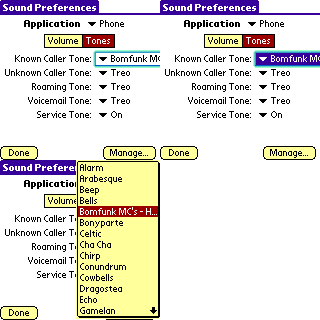
The following example shows 3 simple steps of installing a ringtone:
| ||||||||||



|
|
|
||||||||
|
||||||||||
|
TopRingtoneInstaller can install virtually any MP3 or MIDI file to your Treo or Centro smartphone, however in some rare occasions (depending on the music file format) the "Phone" application may not be able to play it. The size of MIDI files is restricted by the system to no more than 64K. MP3 files can be of any size, but remember that the memory of your device is limited. After installing a ringtone, you may modify its properties or remove it with the built-in "Sounds" application. Treo smartphone models that support MIDI ringtones only: Treo 180, Treo 180g, Treo 270, Treo 300, Treo 600. Models that support MP3 and MIDI ringtones: Treo 650, Treo 680, Treo 700p, Treo 755p, Palm Centro. | ||||||||||
|
|
|
||||||||
|
||||||||||
|
|
|
||||||||
|
||||||||||
 Forum - read comments about TopRingtoneInstaller and post your own messages. Forum - read comments about TopRingtoneInstaller and post your own messages.
| ||||||||||
|
|
|
||||||||
|
||||||||||
|
So you have a Treo or Centro device... Great! Visit the Software for Treo and Centro smartphones web site to discover all our applications for your phone! | ||||||||||
Palm, Treo, and Centro are trademarks or registered trademarks of Palm, Inc.
Copyright © 2026 RNS::
Copyright © 2026 RNS::